The LISEN Tablet Stand pairs a clamp-on arm with separate holders for a tablet and a phone, giving people a flexible way to position either device hands-free.
This LISEN Tablet Stand iPad Holder Desk Mount review looks at its adjustment range, mounting limits, and the tradeoffs to consider before making it part of a work or home setup.
LISEN Tablet Stand Review Summary
The quick verdict
2,000+ ratings
Read Amazon ReviewsLISEN Tablet Stand
A flexible clamp-on stand for people who want hands-free tablet or phone positioning at a desk, counter, or other compatible surface.
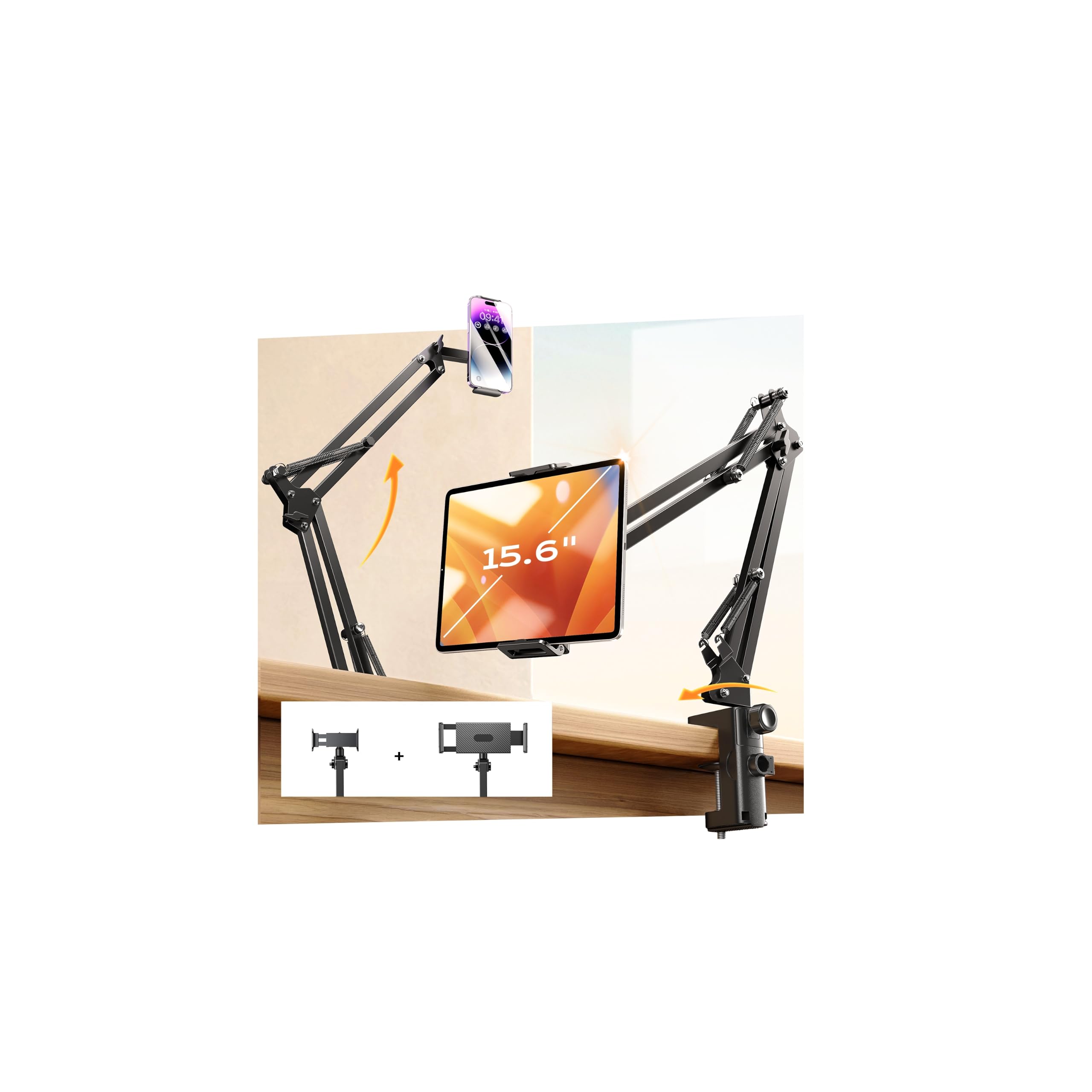
- Includes two device clamps, one intended for tablets and one for phones.
- Designed for devices in the 4- to 13-inch range; check your device dimensions and how its case affects clamp fit.
- The arm has four joints and six adjustable nodes, with 360-degree rotation for repositioning.
- A clamp base is intended for desks, dining tables, kitchen counters, and other surfaces up to 2.83 inches thick.

Pros
- Two device clamps make it possible to use the stand with a tablet or a phone.
- Several joints and rotation give users options for positioning a screen around a seated or standing task.
Consider before buying
- The 2.83-inch surface-thickness maximum rules out thicker desks and counters.
- The manufacturer does not recommend mounting it on metallic surfaces, which limits placement options for some work areas.
Read the full review summary
The stand is designed around two device clamps, a desk or counter clamp, and an arm with multiple adjustment points.
That combination can suit routines that move between video calls, reading, cooking, or viewing a screen while working, especially when one mount needs to accommodate both a tablet and a phone.
Its key fit checks are device width, mounting-surface thickness, and the amount of reach and movement your setup needs.
The product description gives a maximum surface thickness of 2.83 inches and a 3.2 kg support figure; buyers should treat those as design limits and check that their own device and surface are a sensible match.
The buying factors
LISEN Tablet Stand Scorecard
Editorial scores reflect listed features and buyer fit; they are not laboratory measurements or customer ratings.
Device versatility
Separate tablet and phone clamps provide flexibility across two device types, with a stated compatibility range of 4 to 13 inches.
Position adjustment
Four joints, six adjustable nodes, and 360-degree rotation suggest several ways to position a screen.
Mounting flexibility
The clamp is intended for desks, dining tables, and countertops up to 2.83 inches thick, though the design is not recommended for metallic surfaces.
Support design
A carbon-steel arm, reinforced joints, and a support figure of up to 3.2 kg give buyers useful design details, but the fit and setup still matter.
Everyday convenience
A hands-free mount can be useful for calls, reading, streaming, studying, or following instructions while working.
Setup confidence
The tightening knob is described as a way to reinforce stability, so buyers should plan to adjust it and check the mounted setup before use.
Key Features and Specifications of LISEN Tablet Stand
- Includes two device clamps, one intended for tablets and one for phones.
- Designed for devices in the 4- to 13-inch range; check your device dimensions and how its case affects clamp fit.
- The arm has four joints and six adjustable nodes, with 360-degree rotation for repositioning.
- A clamp base is intended for desks, dining tables, kitchen counters, and other surfaces up to 2.83 inches thick.
- The arm is described as carbon steel with lengthened and thickened joints, and a support figure of up to 3.2 kg.
- The description notes a tightening knob for reinforcing stability and says the stand is not recommended for metallic surfaces.
Pros and Cons of LISEN Tablet Stand
Pros
- Two device clamps make it possible to use the stand with a tablet or a phone.
- Several joints and rotation give users options for positioning a screen around a seated or standing task.
- The clamp base can attach to a range of common table and counter surfaces within its stated thickness limit.
- The product description specifies a support figure and construction details that help buyers assess whether the design fits their setup.
Consider before buying
- The 2.83-inch surface-thickness maximum rules out thicker desks and counters.
- The manufacturer does not recommend mounting it on metallic surfaces, which limits placement options for some work areas.
- A multi-joint arm and clamp need careful positioning and tightening; buyers seeking a compact stand that simply rests on a desk may prefer another format.
Who Should Buy LISEN Tablet Stand?
Good fit
Consider the LISEN Tablet Stand if you want one clamp-on arm that can hold a tablet or a phone and can be repositioned for different tasks.
Its two device clamps and adjustable joints are useful for a workspace that shifts between calls, reading, and viewing content.
Before buying, measure the mounting edge and confirm it is no thicker than 2.83 inches.
Check that the device falls within the stated 4- to 13-inch range, and consider its weight and case when judging whether the clamp and arm are appropriate for your setup.
This design may be especially useful where a fixed desktop stand would take up room or where you want to move a screen closer to eye level.
After clamping it in place, tighten the knob and confirm the arm holds the device where you intend to use it.
Who should skip it
Skip this mount if your only suitable attachment point is thicker than 2.83 inches or is a metallic surface, since those conditions conflict with the described mounting guidance.
It may also be a poor fit if you need a stand that sits on a tabletop without clamping, or if your device is outside the stated size range.
Check the clamp’s fit with your device and case before relying on it for a particular setup.
How the LISEN Tablet Stand fits a flexible desk setup
Two clamps for a mixed-device routine
Having a tablet clamp and a phone clamp gives the stand a broader role than a mount designed around just one device type.
It can make sense for someone who alternates between a larger screen and a phone, though the description does not establish that both devices can be mounted at once.
Adjustment for changing screen positions
Four joints, six adjustable nodes, and 360-degree rotation point to a mount intended for frequent repositioning.
That range can help with different viewing angles, but buyers should consider the arm’s reach and the space around the mounting edge to make sure the available movement suits their desk.
Mounting limits are central to fit
The clamp base is described for surfaces up to 2.83 inches thick, and metallic surfaces are not recommended. Measure the actual attachment point rather than the overall tabletop, and check the surface material before choosing a spot.
Support figures need to match the whole setup
The product description gives a support figure of up to 3.2 kg and identifies a carbon-steel arm with reinforced joints.
For a practical fit check, compare your device’s weight with that figure and make sure the clamp is secure and the arm stays in the desired position after adjustment.
Alternatives to LISEN Tablet Stand
No alternative model is recommended here. Compare the mounting style, device fit, and adjustment range that matter to your routine before choosing another option.
Is LISEN Tablet Stand Worth It?
The LISEN Tablet Stand is worth considering if you want a clamp-on arm with separate tablet and phone holders and enough adjustment points to change screen position.
Its strongest fit is a desk or counter setup that falls within the stated mounting and device-size limits.
Measure the mounting edge, check the surface material, and compare your device’s fit and weight with the product’s stated limits before buying.
If your setup requires a freestanding base, a thicker mounting edge, or a metallic surface, this design is less suitable.
Your review at a glance
2,000+ ratings
Read Amazon ReviewsLISEN Tablet Stand
A flexible clamp-on stand for people who want hands-free tablet or phone positioning at a desk, counter, or other compatible surface.
- Includes two device clamps, one intended for tablets and one for phones.
- Designed for devices in the 4- to 13-inch range; check your device dimensions and how its case affects clamp fit.
- The arm has four joints and six adjustable nodes, with 360-degree rotation for repositioning.
- A clamp base is intended for desks, dining tables, kitchen counters, and other surfaces up to 2.83 inches thick.